Most advice about internal linking is too shallow to be useful for a B2B team. “Add more links,” “use descriptive anchor text,” and “avoid orphan pages” are all fine as reminders, but they don't tell you how to turn a content library into a system that moves buyers toward pipeline.
A real internal linking strategy does three jobs at once. It helps search engines understand which pages matter. It helps buyers move from education to evaluation. And it lets you allocate authority to the pages most likely to influence demos, trials, and revenue.
That's the shift that matters. Internal linking isn't a cleanup task for junior SEO staff. It's an operating layer that connects content architecture, user intent, and commercial priorities.
Table of Contents
- Why Your Internal Linking Strategy Is Probably Broken
- Mapping Links to the B2B Buyer Journey
- Designing Your Hub and Spoke Linking Architecture
- A Repeatable Workflow for Implementation
- Auditing and Measuring Your Linking Performance
- Advanced Tactics and Experiment Templates
Why Your Internal Linking Strategy Is Probably Broken
Most B2B websites don't have an internal linking strategy. They have accumulated links. That's not the same thing.
Content teams publish articles, product marketers ship landing pages, demand gen launches campaign assets, and nobody owns the connective logic between them. The result is predictable. Important pages sit too deep, commercial pages get little contextual support, and blog traffic pools in educational content without moving people toward action.
The scale of the gap is larger than many teams expect. An InLinks analysis of over 5,000 websites found that 82% of internal linking opportunities were missed, and 41% of sites had no internal links pointing to their target pages at all. That should end the idea that internal linking is a minor polish task.
What “broken” usually looks like
A weak structure often shows up in familiar patterns:
- Blog posts link sideways, not forward. Articles send readers to more articles, but rarely to comparison pages, integration pages, use case pages, or demo-oriented assets.
- Navigation carries too much weight. Teams assume menu and footer links are enough, even though contextual links inside content usually send a clearer signal about relevance.
- Authority gets trapped. Pages that earn backlinks or brand traffic don't pass much value to pages that influence sales conversations.
- New content launches isolated. Writers publish strong pages, then wait for search engines and users to discover them on their own.
Practical rule: If your highest-intent pages rely mostly on site navigation for internal links, your structure is underpowered.
This matters beyond rankings. When internal links are weak, buyers hit dead ends. They read a strong educational page and leave because the next logical step isn't obvious. Sales asks why content “doesn't convert.” Marketing blames traffic quality. The core problem is often architectural.
Why this becomes a revenue problem
Internal links shape who sees what next. On a B2B site, that means they influence whether a prospect moves from problem awareness to product evaluation, or bounces after consuming one helpful article.
A good structure supports pages by business role, not just by publication date or keyword theme. Your pricing page, demo page, solution pages, industry pages, and comparison pages need deliberate internal support. If they don't get it, you're asking search engines and users to guess which assets matter most.
Only 5% of websites reached an internal linking score of 80% or higher in the same InLinks dataset, which shows how rare disciplined execution still is on real sites, not theoretical examples. For B2B teams, that's an opportunity. Most competitors are still treating internal linking like housekeeping.
Mapping Links to the B2B Buyer Journey
A B2B site shouldn't act like a library. It should act like a guided system.
When teams approach internal linking page by page, they usually create local relevance but miss funnel progression. The better model is to map links against buyer intent. That means deciding which pages introduce a problem, which pages frame solutions, and which pages help someone choose a vendor.
Start with intent, not URLs
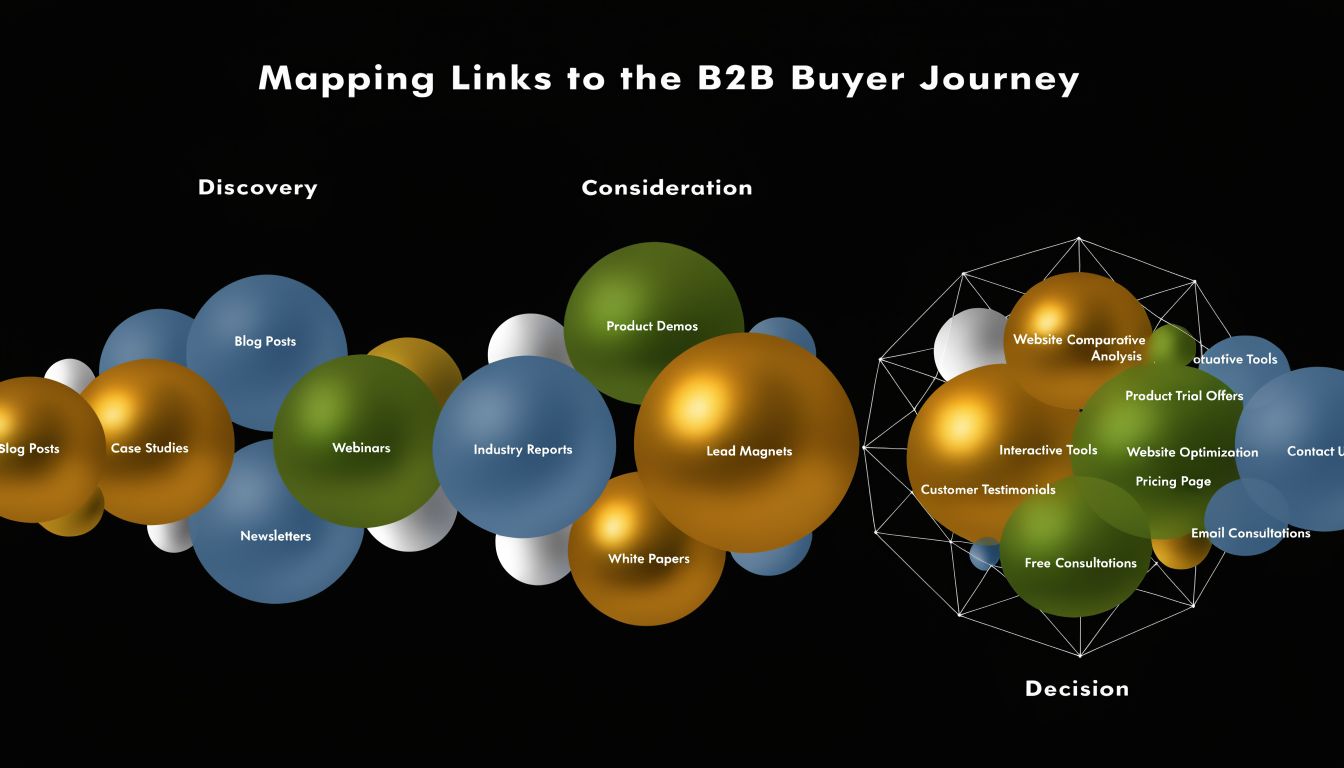
Most B2B content falls into three broad stages.
- Awareness content includes educational blog posts, glossary pages, research explainers, and trend pieces.
- Consideration content includes frameworks, comparison pages, templates, webinars, use case pages, and solution explainers.
- Decision content includes pricing, product pages, implementation pages, case studies, demo pages, and sales enablement content.
The mistake is assuming that because these assets exist, buyers will naturally find their way through them. They won't. Teams need to design those pathways.
A practical workflow starts with pillar pages and then adds contextual links from high-authority pages to newer or underlinked pages. As Search Engine Land's internal linking guide notes, this isn't a one-time task, because links from pages with real authority pass the most value as rankings and visibility change.
Build paths between stages
Think in sequences, not isolated links.
An awareness article about compliance automation shouldn't just link to another educational article. It should usually offer at least one next-step path to a commercial-adjacent page such as:
- A use case page for teams solving that exact problem
- A comparison page for buyers evaluating categories or vendors
- A product capability page tied to the pain point
- A conversion asset such as a demo, assessment, or pricing page when intent is strong enough
That doesn't mean every article should aggressively push product. It means every valuable page should have a deliberate onward path.
A buyer journey with weak internal links behaves like a leaky funnel. Attention enters, but intent rarely reaches the pages that monetize it.
Here's a simple mapping model many teams can use:
| Page type | Primary intent | Should usually link to |
|---|---|---|
| Educational blog post | Problem awareness | Pillar page, related use case page, comparison asset |
| Pillar page | Topic consolidation | Cluster pages, product or solution pages |
| Use case page | Problem-solution fit | Product page, integration page, demo page |
| Comparison page | Vendor evaluation | Pricing, demo, implementation content |
| Product page | Solution validation | Demo, pricing, customer proof |
The important part is the logic. Awareness content earns discovery. Consideration content narrows fit. Decision content removes friction.
When teams build internal links this way, they stop treating blog traffic as a vanity metric and start using content to qualify interest. That's the difference between an SEO program that “drives visits” and one that supports pipeline.
Designing Your Hub and Spoke Linking Architecture
The hub and spoke model is still the most practical structure for scaling internal links on a B2B site. It works because it aligns information architecture with how buyers and search engines both process relevance.
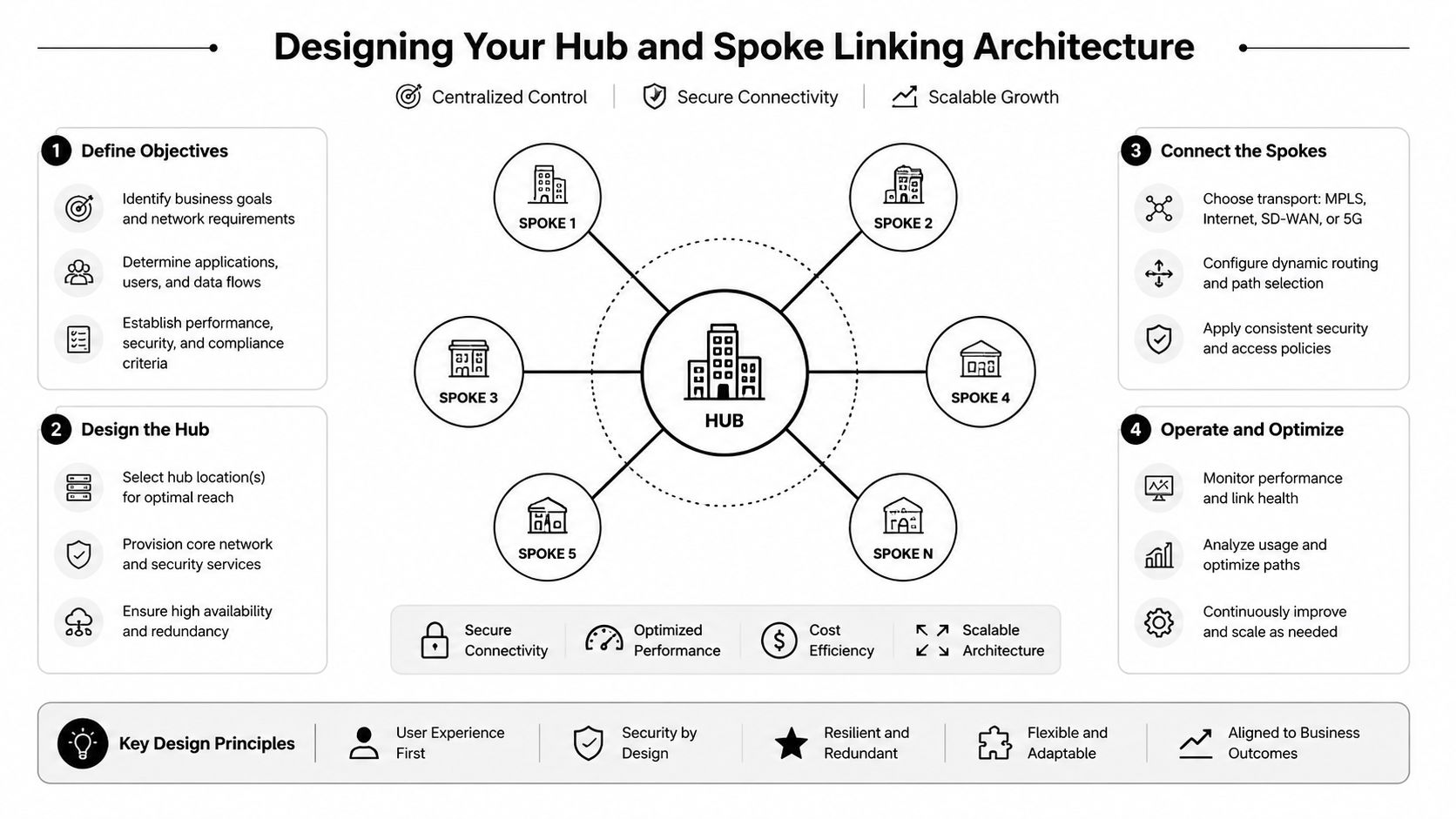
A hub is the primary page for a broad commercial or strategic topic. A spoke is a supporting page that covers a narrower intent, subtopic, use case, or long-tail query connected to that hub.
What the hub and spoke model actually does
On a B2B site, a strong hub often maps to one of these assets:
- a broad solution page
- a major category page
- a cornerstone guide
- a high-value integration page
- a central industry or use case page
The spokes do the detail work. They answer narrower questions, target specific pain points, address objections, or cover adjacent terms. Their job isn't just to rank on their own. Their job is to reinforce the hub and create multiple entry points into the same commercial area.
A healthy pattern looks like this:
- The hub links down to its most relevant supporting pages.
- Each spoke links back to the hub using clear, natural anchor text.
- Related spokes cross-link when intent overlap is real.
- Commercial pages receive support from informational pages where the transition makes sense.
This model is disciplined, not rigid. You don't need every page to link to every other page in a cluster. In fact, that often makes the structure worse.
The common advice to “just add links” misses the trade-off between link quality and volume. A discussion of internal linking trade-offs from Simon Ward warns that linking between unrelated topics can confuse entity relationships, and it cites a benchmark of 2–5 contextual links per 1,000 words as a practical ceiling to avoid diluting topical clarity.
Anchor Text Strategy by Use Case
Anchor text deserves more care than it usually gets. Teams often swing between two bad extremes. They either use vague anchors like “learn more,” or they force the same keyword into every link.
Use variety with intent.
| Anchor Type | Example | Primary Use Case |
|---|---|---|
| Exact match | internal linking strategy | Use when the destination page directly targets that phrase and the sentence reads naturally |
| Partial match | build a stronger internal linking framework | Use for semantic variation and to avoid repetitive anchors |
| Branded | Acme platform | Use on product, company, or branded solution pages |
| Navigational | see pricing | Use for action-oriented paths to high-intent pages |
| Naked URL | acme.com/pricing | Rarely needed in body copy, mostly for documentation or reference contexts |
A few operating rules help:
- Match the promise of the anchor to the destination. If the anchor suggests a comparison, the page should be a comparison page.
- Prefer in-sentence context. A link inside a relevant sentence usually gives better semantic clarity than a generic CTA block alone.
- Vary anchors across the cluster. Repeating the identical phrase on every page creates awkward copy and weakens editorial quality.
The best anchor text sounds like a helpful recommendation to a reader, not a keyword inserted for a crawler.
What usually fails
The most common structural problems aren't technical. They're editorial and organizational.
- Everything links to everything. This usually happens after multiple teams update pages without a shared map. The site becomes noisy.
- Pillars are too thin. A page can't act as a hub if it doesn't deserve that role.
- Clusters don't connect back up. Supporting pages exist, but they don't reinforce the central page.
- Commercial pages sit outside the cluster. Teams keep informational content tightly linked, then forget the pages tied to revenue.
When the architecture is right, internal links clarify the site's opinion about topic importance. When it's wrong, they blur it.
A Repeatable Workflow for Implementation
Internal linking breaks down when it depends on memory. If writers need to “remember to add some links,” the structure will decay fast.
The fix is operational. Build linking into publishing, updates, and quarterly optimization work so it happens whether or not one SEO manager is watching every page.
For new content
Every new page should launch with a minimum viable link plan. That plan doesn't need to be complicated, but it should be explicit.
A practical pre-publication checklist:
- Define the page's role. Is it a hub, a spoke, a commercial page, or a support asset?
- Choose parent and sibling pages. Identify the hub it should support and the adjacent pages that are relevant.
- Insert outbound contextual links. Point users toward the next best pages, not just related reading.
- Create inbound links before or at publish. Update older pages so the new page doesn't launch isolated.
Tools help automate this process. Google search operators can surface existing mentions, while a crawler like Screaming Frog can identify strong candidates for insertion. In a CMS like WordPress, editorial teams can also use content inventories or custom fields to flag cluster membership before drafting starts.
For existing content
Retrofitting an old site requires prioritization. Don't start with the pages that are easiest to edit. Start with the pages that already have authority or attention.
I usually prioritize in this order:
- High-traffic informational pages that rank well
- Pages with external backlinks or strong brand visibility
- Commercial pages that matter to pipeline but have weak contextual support
- New pages that need faster discovery and reinforcement
Then apply a simple pass:
- scan the page for natural mentions of cluster topics
- add one or more contextual links where user intent supports them
- remove stale or irrelevant links that distract from the path
- check whether the page should send users deeper into evaluation
Keep the system from decaying
The teams that maintain strong internal linking don't treat it as a one-off project. They assign ownership and define triggers for refreshes.
Useful triggers include:
- A page starts ranking. Revisit it because links from pages with earned visibility can pass more value.
- A new cluster launches. Update existing hubs and related spokes.
- A quarter's pipeline priorities change. Shift support toward pages tied to current sales motions.
- A migration or URL change happens. Validate old links immediately.
A repeatable workflow doesn't need to be heavy. It needs to be consistent. Once linking is part of briefs, publishing checklists, and content refresh cycles, the strategy stops depending on heroic cleanup work.
Auditing and Measuring Your Linking Performance
A good audit doesn't ask, “Did we add links?” It asks whether the right pages are receiving enough support.
That changes the review process. You're not only looking for technical errors. You're checking whether your internal linking strategy reflects business priorities, topical structure, and actual site performance.

A solid benchmark is to use Google Search Console's Internal Links report to see which pages already attract the most links, then use site crawlers to find orphaned pages and weak structures. A Siteimprove guide to internal linking strategy also points out a common failure mode: teams treat internal linking as static navigation instead of an adaptive system tied to performance data.
What to check in your audit
Use Search Console, Screaming Frog, Sitebulb, or another crawler to review these areas:
- Orphaned pages. Important pages with no incoming internal links are hard to discover and easy to underperform.
- Crawl depth. Pages that matter to revenue shouldn't require a long click path from stronger sections of the site.
- Redirected or broken internal links. These waste crawl paths and create avoidable friction.
- Weak inlink distribution. Pages central to your funnel may have far less support than older blog posts or legal pages.
- Anchor text patterns. Look for vague, repetitive, or misleading anchors that hide intent.
A quick diagnostic table can help teams align faster:
| Audit signal | What it usually means | What to do |
|---|---|---|
| Key page has few internal links | Page isn't integrated into the content system | Add contextual links from relevant high-visibility pages |
| Blog hubs get most links, commercial pages get few | Authority is pooling in top-of-funnel content | Build paths from educational pages to evaluation pages |
| Many footer or menu links, few in-content links | Structure relies on navigation, not context | Add contextual links inside body copy |
| Orphan pages exist in important clusters | Publishing process is broken | Add inbound links and assign cluster ownership |
Tie link distribution to business value
Many audits stop too early because they find problems without connecting them to money.
Your most important pages aren't always the ones with the most traffic. A pricing page, integration page, product-led comparison page, or industry solution page may influence pipeline far more than a popular glossary article. If those pages lack internal support, you have an allocation problem.
Review internal links the same way you'd review budget. Ask which pages deserve more support based on commercial return, not just current visibility.
A stronger reporting habit is to group pages by business role:
- Demand capture pages such as informational articles
- Evaluation pages such as comparisons and solution pages
- Conversion pages such as demos, pricing, and sales-contact assets
Then compare current internal support across those groups. If your site overwhelmingly supports discovery content while starving evaluation and conversion pages, the architecture is misaligned with revenue.
That's also why internal linking shouldn't be delegated entirely to content operations. SEO, content, product marketing, and demand gen all influence which pages deserve priority.
Advanced Tactics and Experiment Templates
Once the foundation is stable, the next gains come from restraint and testing. Mature teams don't ask, “How many links can we add?” They ask, “Which links change outcomes?”
That mindset matters because internal linking has diminishing returns. A Zyppy analysis of 23 million internal links found that pages with 0–4 incoming internal links averaged two Google Search clicks, while pages with 40–44 incoming internal links averaged roughly four times as many clicks. After about 45–50 internal links, the relationship reversed and traffic declined as link counts increased further.
Where diminishing returns show up
You usually see over-linking in a few situations:
- Template-heavy blogs that inject large related-post modules everywhere
- Enterprise sites where multiple teams cross-link aggressively across unrelated products
- Old content refreshes where editors add links without removing weak ones
- Pillar pages that try to link to every possible subtopic on one screen
The result isn't just dilution. It also creates cognitive noise for buyers. When every paragraph contains a link, none of the links feels important.
Simple tests worth running
You don't need complex experimentation infrastructure to improve this layer. A few practical templates work well.
Anchor text refinement test
Pick an established page with stable traffic. Update one or two internal anchors pointing to a target page so the language better matches user intent. Monitor whether the destination page improves in relevance and engagement over time.Authority reallocation test
Select a handful of high-visibility informational pages. Add contextual links to one strategically important comparison or solution page, then compare that page's discovery and engagement trend against a similar untouched page.Link pruning test
On a page with excessive contextual links, remove lower-value links and keep only the strongest onward paths. Watch whether user flow becomes cleaner and whether the destination pages get more qualified engagement.
Internal linking is one of the few SEO levers you fully control. That makes it ideal for structured experimentation.
The key is to document the intent behind each test. Don't chase volume. Treat internal links like a portfolio. You're allocating finite attention and authority across pages that don't all have equal business value.
If your team wants a practical environment to test frameworks like these, SEO Lab Sandbox is built for hands-on B2B search experimentation. It helps marketing teams connect strategy, technical SEO, AI-assisted content operations, and measurement so internal linking becomes part of a repeatable growth system instead of a backlog item.
Made with Outrank tool